Showing posts with label mobile tutorials. Show all posts

Thursday, November 6, 2014

[New] Android 4.4 KitKat Features and Release Date

- 0 comments
Android's latest version 4.4 which is known as KitKat, is just a few days old, KitKat has several hidden features. Android 4.4 KitKat now allows you to perform many tasks with just your voice. Much like Motorola's Touchless Control, you can say "OK Google" - no need to touch the screen - to perform searches, send messages and more. 

Android 4.4 is only available on the Nexus 5, of course, although Google said other smartphones should be able to upgrade in "the coming weeks." (Any phone sold through a wireless carrier will need a carrier-approved upgrade.) 


KitKat is designed to work on a wide variety of devices with different amounts of RAM, even devices with as little as 512MB. But while memory optimization is the biggest change in this version of Android, KitKat also features a wide variety of new developer features and functions app makers will want to learn and exploit.  


  • Android 4.4 KitKat Features: 


Android 4.4 KitKat on the other hand is loaded with new features and tweaks. The full list is long and exhausting, but there are some new features in Android 4.4 KitKat that you should know about. 


1. Full-screen Immersive Mode: Now, you can switch to full-screen to see more and simply swipe from the top or bottom edge of the screen to get the buttons back. 

2. NFC: For those with NFC, Android 4.4 introduces a new, open architecture for NFC payments that works with any mobile operator. 

3. Ok Google: This will let you voice search, send a text, get directions or play a song - as long as you're on the homescreen on in Google Now.

4. Improved multi-tasking: Multi-tasking is pretty good in Android already but Google says it's even better in KatKat thanks to memory optimisation and "improving your touchscreen so that it responds faster and more accurately than ever before". 

5. Low-power audio playback: Android 4.4 allows for more hours of audio playback, up to 60 hours on Nexus 5, according to Google. 


6. Calls and messages: The new phone app orders your contacts based on the ones to interact with most and you can also search for contacts or nearby places in the search bar. 

7. Printing: Now you can print photos, documents, and web pages directly from your phone or tablet. 

8. Google Drive: A handy new feature is the ability to save files, from apps like Quick-office, to Google Drive (or other cloud storage providers). 

9. Bluetooth MAP support: Android 4.4 KitKat now supports the Message Access Profile (MAP) so cars with Bluetooth can exchange messages with your device. 

10. Chrome cast support: Google's Chromecast HDMI dongle is supported in 4.4 KitKat for wireless streaming of content such as Netflix and YouTube. 

 11. Chrome web view: Applications that embed web content now use Chrome to render web components accurately and quickly. 

12. Device management: If should lose your precious smartphone or tablet, you can find or remote wipe it with Google's Android Device Manager. 

13. Downloads app redesign: Google has given the Downloads app a redesigned, adding a new sorting options plus list and grid views for all the files you've, er, downloaded. 14. Easy home screen switching: If you love customizing to the extent that you have installed one or more home screen replacements, you can switch between them easily in 'Home' section of the settings menu. 

15. Full-screen wallpapers with preview: Wallpapers now display through the status bar and navigation bar. When picking a new wallpaper, you can preview what it will look like. 

 16. Infrared blasting: Android now supports applications for remote control of TVs and other nearby devices if you have an infrared (IR) transmitter. 

17. Secure app sandboxes: Application sandboxes have been hardened with Security-Enhanced Linux. 

18. Location modes and monitoring: If you make your battery last longer by constantly switching GPS, Wi-Fi and mobile data on and off then there's an easier way in KitKat. 

19. Music and movie-seeking and artwork on the lock screen: From the lock screen you can jump to a specific part of a song or video with a long press on the play or pause buttons. Artwork is now fills the lockscreen. 

 20. Step counting: If you don't want to spend money on a fitness gadget then the Nexus 5 can act as a pedometer to count your steps. 


  • Android 4.4 KitKat release date: 


For those of you wondering whether your Nexus 7, Nexus 4 or Google Play Edition of the Galaxy S4 and HTC One is going to get Android 4.4, be patient. Google says the aforementioned devices will all get KitKat within the coming weeks. However, the Nexus 5 will ship with the new platform already installed, as we've all expected. When the update does come, we expect it to be pushed to devices with a notification, or users will have the option of refreshing their software update settings furiously until it arrives.
[Continue reading...]

Monday, July 28, 2014

CHERRY MOBILE SNAP HARD RESET 2014

- 2 comments
CHERRY MOBILE SNAP HARD RESET 2014
Hello mga ka CM SNAP Meron kasing nag-papaHARD RESET Sakin ng SNAP pero hindi gumana yun android multi tool na ginamit ko so naghanap akong paraan para ma reset.
para sa meron problema sa "PATTERN ATTEMPTS"

Isa sa problema natin yun pag hard reset ng CM SNAP meron paraan pero need pa ng box like volcano or GPG dragon pero meron akong nakitang solution no need to use BOX 

 ituturo ko sa inyo pano mag hard reset na hindi na gagamit ng box :) 

MGA kakailangain

oras  MAGBASA :)
Follow the instruction carefully :)
Drivers
Debug Tool 
FDL Files 
SC8810 PAC 

STEP 1: Extract ninyo sa desktop 

STEP 2: Install the Driver 

STEP 3: Turn off your cm snap unpluged the usb cable (make sure na nainstall nyo n yun driver) 

STEP 4: open ninyo yun folder na inextract nyo 

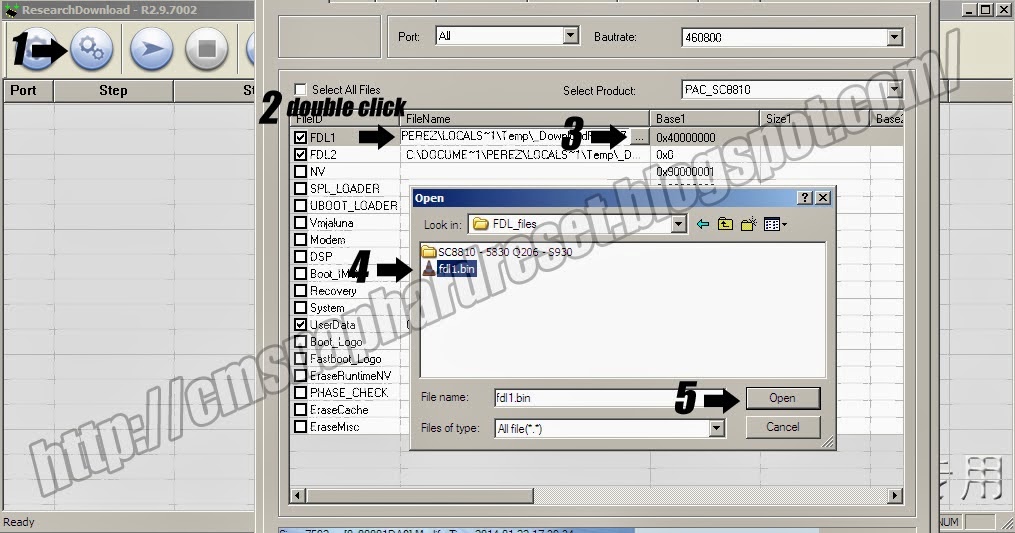
Open: ResearchDownload\bin\ResearchDowload.exe 

open the load pocket
sundan nyo nalang ^_^

tapos open the FDL 1
Sundan nyo nalng ^_^

tapos FDL 2
make sure naka check lahat ng nasa picture aa ^_^

 CLICK "OK"
then hit
PLAY 
Ganito lalabas

NEXT  
HOLD NYO YUN POWER BUTTON NG CM SNAP 
while holding plug nyu ang USB CABLE

then hindi tayin nyo lumabas yun "PASSED"


Tapos pwede na ninyo i unpluged yung usb cable


then alisin nyo ang battery then balik nyo then open ok na yan RESET na ang CM SNAP NYO :) 
[Continue reading...]

Monday, June 2, 2014

iPhone Secret Codes Reveal

- 0 comments
Today tip will help you to enjoy some secret codes of iPhone mobiles. You can try these tricks to all latest iPhone mobiles. You can display the hidden information of mobile sets and troubleshoot the routine problems using these codes. 

Follow the list of latest iPhone codes list: 


Code Action 

*#61# and tap Call To verify the number of unanswered calls 

*#62# and tap Call Use to verify the number for call forwarding 

*#06# To display the IMEI Number of the mobile 

*777# and tap Call To display the account balance information for prepaid iPhone 

*225# and tap Call To display the account balance information for Postpaid iPhone 

*#67# and tap Call To display the number for call forwarding when the iPhone is busy 

*3001#12345#* To display many of the inner settings of your iPhone 

*#21# To verify the call forwarding is enabled or disabled 

*646# and tap Call To display the Post-paid minute balance 
*#33# and tap Call To Check for call control bars
[Continue reading...]

Nokia Secret Codes Tips and Tricks

- 0 comments
To check the IMEI (International Mobile Equipment Identity) Type- 
*#06# 
Information you get from the IMEI- 
XX X 
TAC FAC SNR SP 

· TAC = Type approval code 
· FAC = Final assembly code 
· SNR = Serial number 
· SP = Spare 
To check the phones Software revision type- 
*#0000# 
Information you get from the Software revision- 
V 05.31 
18-02-99 
NSE-3 
· 1ST Line = Software revision 
· 2ND Line = The date of the software release 
· 3RD Line = Phone type 
To enter the service menu type- 
*#92702689# (*#WAR0ANTY#) 
· Serial number (IMEI) 
· Production date (MM/YY) 
· Purchase date (MM/YY) You can only enter the date once. 
· Date of last repair (0000=No repair) 
· Transfer user data to another Nokia phone via Infra-Red 
Clock Stopping 
To check weather your SIM Card supports clock stopping type- 
*#746025625# (*#SIM0CLOCK#) 

Revealing the Headphone and Car-Kit menus 
Please note that if you do these next tricks, the new menus can't be erased without retoring the factory default settings. To do these tricks you need to short-circuit the pins on the bottom of the phone next to where you plug in you charger. 

1. To activate the "Headset" menu, you need to short-circuit pins "3" and "4". After a short time the word "Headset" will be shown in the display. Menu 3-6 is now enabled. 
2. To activate the "Car" menu, you need to short-circuit pins "4" and "5". After a short time the word "Car" will be shown in the display. Menu 3-7 is now enabled. 

THE REBOOT TRICK 
This should work on all software versions of the 6110. 
1. Go to the Calendar (Menu)
2. Make a note or reminder. 
3. Enter some text into the edit box. 
4. Hold "Clear" until the whole text is cleared, then press "Back". 
5. Press "0". The main screen will now be showing but a space appears on the screen. (you can't see it) 
6. Enter 4 digits (e.g. 1234). 
7. Use the down arrow to move the cursor to the left side of the numbers and the space (Down arrow twice). 
8. Now enter 6 digits and press the call button. 

Wait for a few seconds, the screen should start to flash and reboots. It should alsowork on other menus like the "Profiles" menu. 

EFR CALL QUALITY 
To activate EFR (Enhanced Full Rate) Enter the code- 
*3370# 
This improves call quality but decreases batterylife by about 5% 
To deactivate it, Enter the code- 
#3370# 

THE JAMES BOND TRICK 
If you short-circuit theleft middle and right pins on the bottom of the phone with all connections touching each other, the Nokia software hangs! The profile "Headset" will be activated. Before you do this just activate the "Automatic Answer" in the headset profile and set the ringing volume to "Mute". Now you can use your phone for checking out what people are talking about in a room. Just place it under a table in a room and call it. The phone receives the call without ringing and you can listen to what people are saying. 

NETWORK MONITOR 
There is a hidden menu inside your Nokia phone. If you want to activate it, you'll have to re-program some chips inside of your phone. 
1. Check your software version. You can only continue if you have v4.33, v4.73 or v5.24. 
2. Take apart the phone. 
3. De-solder the EEPROM (ATMEL AT 24C64). 
4. Read out the data with an EEPROM programmer and save it to a file (Backup). 
5. If you have v.33 or v4.73, change the address "03B8" from "00" to "FF". 
6. If you have v5.24 then change the address "0378" from "00" to "FF". 
7. Write the new data to the EEPROM and solder it back to the phone, 
8. Power on your phone and you should have "Netmonitor" enabled. 
The Network Monitor gives you the following information. 

· Carrier number 
· MS RX Level in DBM 
· Received signal quality 
· MS TX power level 
· C1 (Path loss criterion, used for cell selection and reselection). The range is -99 to 99. 
· RTL (Radio link timeout). 
· Timeslot 
· Indication of the transmitter status 
· Information on the Network parameters. 
· TMSI (Temporary Mobile Subscriber Identity). 
· Cell identification (Cell ID, Number of cells being used). 
· MCC (Mobile country code) 
· MCN (Mobile network code) 
· LAC (Location area code) 
· Ciphering (On/Off) 
· Hopping (On/Off) 
· DTX (On/Off) 
· Discard cell barred information 

CHECK SIM-LOCK 
Note - If you bought your Nokia on UK Vodafone or UK Cellnet you do not need to check this because they both transmit on GSM900, and they don't lock the phones. However if you bought your phone on UK Orange or UK One2one your phone may be blocked. The reason is that they both transmitt on GSM1800. To make a call on GSM1800 you need what is known as a "Dual band" phone. A dual band phone is able to transmit on both GSM900 and GSM1800, so they lock the phones so you can't use it with any other network simcard. If you find that your phone is locked you can try different software to unlock it. (we havn't found one that works yet), or you can ask your service provider who will gladly exchange the 10 digit code for about £35. 
This is how to check the status of the 4 different locks. Aslo don't try entering the wrong number, because after 3 times it will block the phone for good. 

There are 4 different locks on your Nokia phone. 
· COUNTRY-LOCK 
· NETWORK-LOCK 
· PROVIDER-LOCK 
· SIMCARD-LOCK 
The code to read out the sim-lock status of your phone is 

#PW+(MASTERCODE)+(Y)# 
· # = DOUBLE-CROSS 
· W = PRESS "*" THREE TIMES 
· P = PRESS "*" FOUR TIMES 
· + = PRESS "*" TWO TIMES 
· MASTERCODE = 1234567890 
· Y = NUMBER 1 TO 4 
The master code is a secret code. The code has 10 digits, To read out the sim-lock status you can enter every combination you want! 
"Y" Shows the status of the network-lock. Here you can enter a number from "1" to "4". The "4" is for the sim-card lock. 

SIM-LOCK CHECKS 
· #PW+1234567890+1# = GIVES PROVIDER-LOCK STATUS 
· #PW+1234567890+2# = GIVES NETWORK-LOCK STATUS 
· #PW+1234567890+3# = GIVES COUNTRY-LOCK STATUS 
· #PW+1234567890+4# = GIVES SIM-CARD-LOCK STATUS. 

Hope this helped
[Continue reading...]

Sunday, June 1, 2014

Samsung Secrets Codes & Sim Lock, Network Lock Removing

- 0 comments
Samsung Secret Codes ! 
PROGRAMMER CODES! 

*#06# displays phones IMEI NO. 
*#9999# SW Version. 
*#8888# HW Version. 
*#0842# Vibrator. 
*#0289# Buzzer. 
*#0228# Battery Stat. 
*#0782# RTC Display (?¿) 
*#0523# LCD Contrast. 
*#0377# NVM error log (?¿) 
*#5646# GSM Logo Set. 
*#0778# Sim Serv, Table. (?¿) 
*#0638# SIM Network ID. 
*#0746# SIM info. 
*#0076# Production No. 
*#3323# Forced Crash (?¿ don't know, but dose not sound good) 
*#2576# SIM error. 
*#4357# This screen ( the actural help screen) 
*#9324# Netmon <> press the hung up key to exit. 
*#0778# To see what your SIM suportes. 
*#0746# Your sim type. 
*#32439483 Digital Audio Interference off. 
*#32436837# Digital Audio Interference on. 
*#9998*JAVA# Edit GPRS/CSD settings (S100 only). 
*#9998*Help# Screen / List of codes. 
*#9998*RTC# RTC Display. 
*#9998*bat# Battery Status. 
*#9998*buz# Turns Buzzer On. 
*#9998*vub# Turns Vibator On. 
*#9998*LCD# LCD Contrast. 
*#9998*9999# Sotfware Version. 
*#9998*8888# Hardware Version. 
*#9998*377# Non Volatile Merory Error Log. 
*#9998*NET# SIM NEtwork ID 
*#9998*778# SIM Serv. Table. 
*#9998*968# Remider Tune. 
*#9998*NVM# Displays Non-Volitile Mermory Status. 
*#9999*C# Netmon. 
*#9998*2576# Forces SIM Error. 
*#9998*DEAD# Forces Phone Crash. 
*#9998*533# (LED). 
*#999* Show date and alarm clock. 
*#8999*638# show network information. 
*#9998*5646# change operator logoat startup. 
*#9998*968# View melody alarm. 

*2767*MEDIA# Resets the media on phone <>DELETES all downloaded PICS/TONES <> 
*2767*FULL# Resets the EEPRON* <>°DANGEROUS°<> 
*2767*CUST# Resets the sustom EEPRON. 
*2767*JAVA# Resets JAV downloads ( dealets all downloaded midits) 
*2767*STACKREST# RESETS STACK. 
*2767*225RESET# * VERY Dangerous. 

#0111*0000000# Removes SIM Lock. 

*2767*66335# 
*2767*3700# 
*2767*7100# 
*2767*8200# 
*2767*7300# 
*2767*2877368# 
*2767*33927# 
*2767*85927# 
*2767*48927# 
*2767*37927# 
*2767*28927# 
*2767*65927# 
*2767*29927# 
*2767*78927# 
*2767*79928# 
*2767*79928# 
*2767*82927# 
*2767*787927# 
*2767*73738927# 
*2767*33667# 
*2767*85667# 

*2767*688# = Unlocking code 
*#8999*8378# = All in one code 
*#4777*8665# = GPSR Tool 
*#8999*3825583# = External Display 
*#8999*377# = Errors 
*#2255# = call list 
#*5737425# = JAVA Something chouse 2and it chrashed. 

#*536961# = Java Status Code 
#*536962# = Java Status Code 
#*536963# = Java Status Code 
#*53696# = Java Status Code 

#*1200# = AFC DAC Val 
#*1300# =IMEI 
#*1400# = IMSl 

#*2562# ?¿ white for 15 sec than restarts. 
#*2565# Check Blocking 
#*3353# check code 
#*3837# = ?¿ White for 15 secs than restarts. 
#*3849# = ?¿ white for 15 secs than restarts. 

#*7222# = Operation Typ ( class C GSM) 
#*7224# = I got ERROR ! 
#*7252# = Operation Typ ( Class B GPRS) 
#*7271# Multi Slot ( Class 1 GPRS) 
#*7271# Multi Slot ( Class 4 GPRS) 
#*7337# = EEPROM Reset ( unlock and resets Wap settings) 
#*2787# CRTP ON/OFF 
#*3737# L1 Dbg Data 
#*5133# L1 Dbg Data 
#*7288# GPRS Attached 
#*7287# GPRS Detached 
#*7666# SrCell Data 
#*7693# Sleep Act/Deact ( enable or disable the black screen after doing nothen for a while) 
#*7284# Class B/C Or GPRS 
#*2256# Calibration Info 
#*2286# Battery Data 
#*2679# Copycat Feature (Activate or deactavite) 
#*3940# External loop 9600 bps 
#*8462# sleeptime 
#*5176# L1 Sleep 
#*5187# L1C2G Trace ( activate or deactivate) 
#*3877# Dump Of spy trace 
5/31/2006 12:15 PM 
*#8999*636# Have no clue i see 20 lines 
*#8999*8376263# HW Ver SW Ver and build date 
*#746565# Checks the locks 
*7465625*638*Code# Enables Network lock 
#7465625*638*Code# Disables Network lock 
#7465625*782*code# Disables Subset lock 
*7465625*782*code# Enables subset lock 

*7465625*746*code# Enables SIM lock 
#7465625*746*code# disables SIM lock 

*7465625*28746# Auto SIM lock On 
#7465625*28746# Auto SIM lock Off 

(*Known Unlock CODES*) 

S500/ P400/ E500/ E700/ X100/ X600/ E100/ 
Enter *2767*3855# with and accepted SIM card If this codes fails, Enter *2767*688# or #* 
7337# 

A300/ A400 / A800 
*2767*637# 
Enter code above with an accepted SIM card. 

S100 / S300 / V200 / V205 / E710 / E715 / D410 / X426/ 
*2767*7822573738# 
Enter code above with an accepted SIM card. 
If the code above fails) 
1.) Insert a SIM card which the phone dose not accept. 
2.)If you see wrong Card, type #9998*3323# 
3.)Press exit and select number 7. Phone will reboot. 
4.) Now SIM should work. 
5.) Type *0141# and then press call. 
6.) Power off the phone and inser anther SIM card. 
7.) If a code is requested, enter 00000000.
[Continue reading...]

Globe Bug Tool v1.5 + COMBO LIST by Emphasis

- 1 comments
What is a "Globe Bug?"

It is a jargon used on having a free internet access using Data Cards or Dongles (i.e. Globe Tattoo)  by bugging the service providers promo. Using this trick the automated system will be flooded by a promo registration request even though there's no load or credits. This works only for Globe Tattoo users with 1 peso load balance.


Features:
Promo Lists
Combo Lists 
Automator
Bugging Area
Status Checker

How to Bug Globe Tattoo Sim Cards?


1.) Insert your modem to your PC. (Make sure you only have 1 peso load)
2.) Open the Globe Easy Bugger Tool v1.5 by Emphasis (The download links is at the bottom of this page)
3.) Insert your mobile number and Cick the COMBO LIST>> located at the upper right corner.
4.) Select the combination from the COMBO LIST(It's a radio button i guess :D ) below. (Ex. BBMAX599+SS2000) and click SET COMBO.
5.) Then, Click all the subscribe buttons below your mobile number.
6.) Wait for 2888 for the subscription links (make sure your dashboard is open) and copy each one to the BUGGING AREA. 
7.) Paste the FIRST LINK from the PROMO 1 to Link1, PROMO2 to Link2, PROMO 3 to Link 3 and so on. (make it fast because all links will expire within 30 seconds)
8.) You will receive a message from 8888.
9.) Try to connect your dashboard and browse. IF FAIL, REPEAT STEP 1 -> 9.

Download the Easy Globe Bug Tool v1.5 + Combo List
[Continue reading...]

How To Format Nokia N72, N73, N81, N95, NSeries Mobile Phones

- 0 comments
How to Format Nokia N72, N73, N81, N95, NSeries Mobile Phones.

Method 1: Three Finger Reset for Nokia Phone
1. Switch off your Nokia phone.

2. Hold down the following three keys, Green (call answer button) * Key, and Number ‘3? key.

3. While holding these buttons, press the power button and switch on the phone.

4. Wait for message ‘Formatting’ to appear on the screen and release all keys once you see that message.

Method 2: Hard Format of Nokia Mobile Phone
1. Switch off your Nokia phone

2. Now Press following key sequence *#7370#

3. Enter Default lock code is 12345.

4. While holding these buttons, press the power button and switch on the phone.

5. Wait for message ‘Formatting’ to appear on the screen and release all keys once you see that message.

Method 3: Soft Reset of Nokia Mobile Phone
1. Switch off your Nokia phone

2. Now Press following key sequence *#7780#

3. Enter Default lock code is 12345.

4. While holding these buttons, press the power button and switch on the phone.

5. Wait for message ‘Formatting’ to appear on the screen and release all keys once you see that message.

Please Note: The Above Nokia Phone Formatting method will erase all your Phone data. So do backup before proceeding for Formatting
[Continue reading...]

Android Mobile Phone Secret Codes List

- 0 comments

Android is a tricky OS and has lots of secrets. Try this series of secret codes. 
Some will and some may not work on your device.

1. Phone Information, Usage and Battery – *#*#4636#*#*
2. IMEI Number – *#06#
3. Enter Service Menu On Newer Phones – *#0*#
4. Detailed Camera Information – *#*#34971539#*#*
5. Backup All Media Files – *#*#273282*255*663282*#*#*
6. Wireless LAN Test – *#*#232339#*#*
7. Enable Test Mode for Service – *#*#197328640#*#*
8. Back-light Test – *#*#0842#*#*
9. Test the Touchscreen – *#*#2664#*#*
10. Vibration Test – *#*#0842#*#*
11. FTA Software Version – *#*#1111#*#*
12. Complete Software and Hardware Info – *#12580*369#
13. Diagnostic Configuration – *#9090#
14. USB Logging Control – *#872564#
15. System Dump Mode – *#9900#
16. HSDPA/HSUPA Control Menu – *#301279#
17. View Phone Lock Status – *#7465625#
18. Reset the Data Partition to Factory State – *#*#7780#*#*
19. Format Your Device To Factory State(will delete everything on your phone) – *2767*3855#
20. Hidden Service Menu For Motorola Droid – ##7764726

[Continue reading...]

How to Root Any Android Device Without Using a Computer

- 0 comments

Here an one-click application to install Superuser and su binary on phone. Look at the compatibility lists below to see if this application can be useful for you.


Feedbacks on compatibility devices will be greatly appreciated in order to update the compatibility list. Superuser and su binary include in application work from android 2 to 4.

Installation
Download it on your device (Click Here) Framaroot 1.9.1
Install it with a file explorer or directly from your internet browser, if android warn you about security risk, say OK and check Unknown sources to allow install of applications outside of Play Store.

Usage

Open Framaroot and select one of the following action: Install SuperSU, Unroot or Execute script (for advanced users)

Possible case once application is launched
A popup saying "Your device seems not vulnerable to exploit included in Framaroot", in this case you can uninstall app
You seeing one or more exploit name, also click on one after you have selected an action and you will see one of the below messages

Possible case once exploit is selected
"Success..Superuser and su binary installed. You have to reboot your device"
"Failed..Exploit work but installation of Superuser and su binary have failed"
"Half-Success..system partition is read-only, use local.prop trick. Reboot your device and use adb to see if it run as root", happen when the filesystem in use on system partition is a read only filesystem (ex: squashfs)
"Failed..Try another exploit if available"
Framaroot crash or freeze, in this case relaunch Framaroot a second time and select the same action and exploit

Compatibility for Qualcomm devices (Gandalf exploit only) :
ASUS Memopad FHD 10 LTE
Asus Padfone 1/2
Asus Padfone A66
Asus Padfone Infinity
Asus Transformer Pad Infinity TF700KL
BLU Studio 5.3 S
BW T18+ (Fortis Evo)
Cloudfone Thrill 430x
Disgo 8400g
DNS S4504/S4503/S4502
FAEA F1
Gigabyte GSmart G1315 Skate
Gigabyte GSmart Rio R1
Google Nexus 4
Highscreen Spark/OMEGA Q/Blast/Strike/Boost
Hisense AD683G
HTC One S
Huawei Honor Pro (U8950-1)
Huawei Premia 4g
Huawei U8815/U8816 Ascend G300/G301
Huawei U8825D Ascend G330D
Huawei Y215
K-TOUCH TITAN S100
Karbonn Titanium S5
kyocera Hydro Edge
Kyocera Torque
Lenovo A600e
Lenovo A706
Lenovo S870E
LF-LTE3 (F260S)
LG Nitro HD
LG L1 II
LG L7 II P710/P714/P715
LG Lucid 2 (VS870)
LG Optimus F5 (P875)
LG Optimus G E970/E975
LG Optimus L3 II E425
LG Optimus L5 E610/612/615
LG Optimus L7 II P710/P713/ P714/P715
LG Optimus L7 P700/Р705
LG Optimus LTE 2
MEDION LIFE P4013
Micromax A111 Canvas Doodle
Motorola Defy Mini XT321
Oppo Find 5
Orange Nivo
Orange Yumo
Orange Zali
Pantech Discover
Pantech Flex
Pantech IM-A840S Vega S5
Pentagram Combo
Phicomm i600
Samsung Galaxy Core i8260
Samsung Galaxy Express GT-I8730
Samsung Galaxy Win I8552
Sharp Aquos Phone SH930W
Smartfren Andromax U
Smartfren Andromax i2
Sony Xperia E C1505/Dual C1605
Sony Xperia L C210X
teXet TM-3204R
teXet TM-4677
Xiaomi Mi-2S
ZTE V880G/ZTE V955
ZTE V9815 Grand Memo N5
ZTE Warp Sequent
Waiting feedbacks ...

Compatibility for MTK devices (Boromir, Faramir and Barahir exploits only) :
Acer A1-810
Acer A1-811
Acer Liquid E2
Acer Liquid Z3
Alcatel OT 4030D S'POP
Alcatel OT 8008D Scribe HD
Alcatel OT 997D
Alcatel OT Idol 6012X / Le Mobile Sosh / Orange Hiro
Alcatel OT Idol 6030X/6030D/6030H
Alcatel OT Scribe Easy 8000a
Alcatel OT Star 6010X
Alcatel OT X'Pop 5035D
Amoi N828
Archos 40 Titanium
ASUS Memo Pad HD 7
AVUS A24
Blu Life Play
BLU Studio 5.0 / 5.5
Bq Aquaris 5
Brondi Glory 2
Cat B15
Changhong z9
Cherry Mobile Amber
Cherry Mobile Burst 2
Cherry Mobile Cosmos S
Cherry Mobile Cosmos X
Chinese Star S7589
Coolbox Quore v57
Cube U39GT 3G (CubeTalk 9)
Cube U55GT (CubeTalk 79)
Cubot A890
CUBOT GT90
CUBOT ONE
DAXIAN XY100S
Doogee DG200 Hotwind
Explay HD Quad
Explay infinity II
Explay Polo
Explay Surfer 7.32 3G
Explay Surfer 8.31 3G
Explay X-Tremer
Fly IQ440 Energie
Fly IQ441 Radiance
Fly IQ442 Miracle
Fly IQ443 Trend
Fly IQ446 Magic
Fly IQ450 Quattro Horizon 2
Fly IQ451
Gionee 868H
Gionee Elife E3
Gionee GN 708
Gionee Pioneer P2
GoClever Fone 570Q
GoClever Quantum 4
GoClever Tab M713G
GSmart Aku A1
GSmart Sierra S1
Haier W718
Haipai I9389
HDC I9500/N9006
Highscreen Alpha GTX
Hisense U970
HKC Q79 3G
Hosin v70
Huawei U8836D G500 Pro
Huawei G700-U10 / G700-U20
Huawei Y511
HTM A6
IconBIT NetTAB Space 3G Duo
IconBIT NetTAB Mercury Q7
I-mobile series I-style 7.2
iOcean X7
Jiayu G2
Jiayu G3S
Jiayu G4
Karbonn A30
KENEKSI Beta
Lava iris 405
Lenovo 10.1" Tablet S6000
Lenovo IdeaPhone P700i
Lenovo IdeaPhone S720
Lenovo IdeaTab A3000-H
Lenovo IdeaTab S6000-H
Lenovo P770/P780
Lenovo S720, S820, S920, A390, A850, A516
Lenovo Yoga 10
Le Pan TC802a
M4tel SS1060
Mi354 "Spice Smart Flo Space"
Micromax A58
Micromax A90S
Micromax Canvas 2 Plus
Micromax Canvas 4 A210
Micromax Canvas EGO A113
Micromax Canvas HD
Mlais MX70
MoreFine S6 Pro
Motorola RAZR D1
Motorola RAZR D3
MSI primo 76
MyPhone Agua Iceberg
N800 Mini Note
Neken N6
NEO N003 Advance
Newman N1
Omate TrueSmart
OPPO Find Clover
Oppo findway U7015
OUMEI X5
Overmax Vertis-01/01+
Overmax Vertis-02
Pantech Vega LTE Ex (IM-820L)
Pearl Smartwatch AW-414
Philips W536
Philips W736
Prestigio MultiPhone 4055
Prestigio MultiPhone PAP 3400/4505/5044 DUO
Runbo x5
S09 W63 IP68
Sharp AQUOS SH837W
Shengda S4
Smartfren Andromax V
Star HD9000+
Star S5 Butterfly
Star S6
Starmobile Diamond V3
Starmobile Knight
Symphony Xplorer ZII
TeXet NaviPad TM-7055HD
Texet TM-5277
THL V12
THL W8 Beyond
THL W8S
THL W11
THL W100 (130711)
THL W200
Vonino Ego QS
Vonino Sirius QS
Xiaomi Hongmi
Xolo A600/Q700/Q800/Q3000
Zen Ultrafone 701HD
ZOPO 980/990
ZOPO C2 Platinum
ZOPO C3
ZOPO ZP910
ZOPO ZP300+ / ZP500+
ZOPO ZP900 Leader
ZOPO ZP950H
ZOPO ZP998
ZTE BLADE Q MAXI
ZTE Kis
ZTE N986
ZTE Open
ZTE Roamer 2
ZTE V795
ZTE V880G/H
ZTE V967S
ZTE V987 Grand X Quad
Walton Primo F3i
Walton Primo G1
Walton Primo H2
Wiko Cink Peax 2
Wiko Darkfull
Wiko Darknight
Wiko Iggy
Wiko Ozzy
Wiko Stairway
Waiting feedbacks ...

Compatibility for Huawei K3V2 devices (Pippin exploit only) :
Huawei Ascend G615
Huawei Ascend Mate
Huawei Honor 2
Huawei MediaPad 10 Link
Waiting feedbacks ...

Compatibility for AMLogic devices (Gollum exploit only) :
Waiting feedbacks ...

Compatibility for Samsung devices (Legolas and Aragorn exploits only) :
Samsung Galaxy Core GT-I8262
Samsung Galaxy S Aviator
Samsung Galaxy Proclaim S720C
Samsung Galaxy Young GT-S6312/GT-S6310
Samsung Illusion SCH-I110
Samsung Lightray SCH-R940
Waiting feedbacks ...

Compatibility for Exynos devices (Sam, Frodo, Legolas and Aragorn exploits only) :
AT&T Galaxy Note 2 SGH-I317
Highscreen Explosion
Hyundai T10
Hyundai T7s
Impression 9702 (Exynos 4412)
Lenovo K860/К860i
Newman N2
Meizu MX2
Samsung Galaxy Camera EK-GC100
Samsung Galaxy Note 10.1 GT-N8000, GT-N8010, GT-N8013, GT-N8020
Samsung Galaxy Note 2 GT-N7100
Samsung Galaxy Note 2 LTE GT-N7105
Samsung Galaxy Note 8.0
Samsung Galaxy Note GT-N7000
Samsung Galaxy S GT-i9000
Samsung Galaxy S2 AT&T SGH-I777
Samsung Galaxy S2 Epic 4G Touch - SPH-D710
Samsung Galaxy S2 GT-I9100
Samsung Galaxy S3 GT-I9300
Samsung Galaxy S3 LTE GT-I9305
Samsung Galaxy Tab Plus GT-P6200/GT-P6210
Samsung Galaxy Tab 7.7 GT-P6800/GT-P6810
Samsung SGH-i997 Infuse 4G
T-Mobile Galaxy Note 2 T-889
Verizon Galaxy Note 2 SCH-I605
iBerry Auxus CoreX2 3G and CoreX4 3G

Compatibility for Omap36XX devices (Gimli exploit only) :
Archos Gen8
Cliq 2 MB611
Coolpad Quattro 4G
Droid 2 (a955)
Droid 2 Global (a956)
Droid X (MB810)
LG Marquee LS855
LG P970 Optimus Black
Motorola DEFY+ (MB525 / MB526)
Motorola Droid PRO
Motorola Droid X
Motorola Milestone 2
Motorola XPRT
Parrot ASTEROID Smart
R2D2 (a957)

[Continue reading...]

Internet at your android devices

- 0 comments
I want to share his trick. you can have free internet at your android devices, if you follow this apn settings. 
The Apn trick features are:
-download(up to 150mb)
-upload of files, pics, etc
-update of apps, etc
-for online games
-watch on youtube
-working also at Opera Mobile 12, Dolphin Browser and any unmodded browser and to default browser of phone
-working on almost all apps and games that required internet connection

Go to settings > wireless and network > mobile networks > and make a new access point
Name:anything
access point name: internet
MMSC: http://80.239.242.129/@wap9.info
MMS PROXY: 208.53.157.38
MMS PORT: 80

Final Set as default that newly created access point.
Try to browse.
[Continue reading...]
 
Copyright © 2012. Triple "T" - Posts · Comments
Theme Template by BTDesigner · Powered by Blogger